Higgsfield MCP Free Trial: 3 Days of Unlimited Seedance 2.5
Higgsfield MCP gives you 3 days of unlimited Seedance 2.5 videos, but only on claude.ai in a browser. Setup and how to cancel.
Higgsfield now offers a free MCP trial: for 3 days you can call popular models like Seedance 2.5 and GPT Image from inside Claude, with unlimited generations. There are two limits that are easy to miss, though. Unlimited generation is only available through Higgsfield MCP, not when you generate directly on higgsfield.ai. In my tests with Claude, it only worked in the claude.ai web app. The free trial didn't work in Claude Desktop or Claude Code (CLI).
I signed up myself and took screenshots of every step: activating the trial, adding the connector on claude.ai, and generating a 15-second vertical video from a single prompt. There's one trap along the way: you have to add Higgsfield as a custom connector, not install the Higgsfield entry with the same name from Claude's connector directory.
What is Higgsfield MCP?
MCP (Model Context Protocol) is a standard that lets AI assistants call external tools. Once you connect Higgsfield's MCP server to Claude, you describe the video you want in plain language, and Claude uploads the reference images, picks a model, estimates the cost and submits the job automatically. When the video is done, it shows up right in the chat.
The official page says you don't need an API key; you just sign in with your Higgsfield account. Besides Claude, Higgsfield also offers a way to connect ChatGPT.
Higgsfield free trial and pricing
This is what the plan page said when I activated the trial on 2026-11-24:
Item | Details |
|---|---|
Trial length | 3 days |
Generations | Unlimited, through MCP only |
Concurrent generations | Up to 16 |
Models (as listed on the page) | GPT Image 2 / 2.5 / 2.6, Seedance 2.0, Seedance 2.5, Speech 2.8 HD, VibeVoice, Seed Speech, Seed Audio 1.0 and more |
Cost during the trial | $0 |
After the trial | Converts to the Ultra 3K monthly plan: $75 for the first month, then $129 per month from the second month |
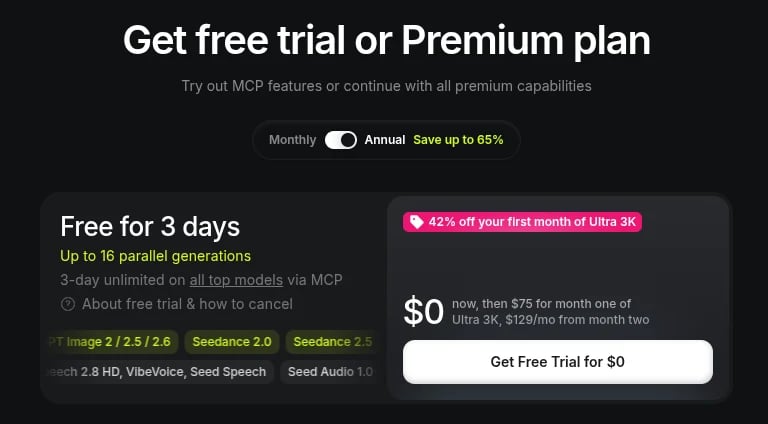
You need to add a credit card first. The trial costs $0, but checkout still asks for a payment method. The checkout page converts the price into your local currency for display; what you're actually charged depends on your card's exchange rate.
If you don't want to pay, remember to cancel. When the trial ends it automatically switches to the Ultra 3K plan. See "How to cancel your Higgsfield subscription" below.
Step 1: Activate the Higgsfield MCP free trial
- Sign up or log in at Higgsfield.
- Open the plan page and click "Get Free Trial for $0".
- Enter a payment method and complete checkout.
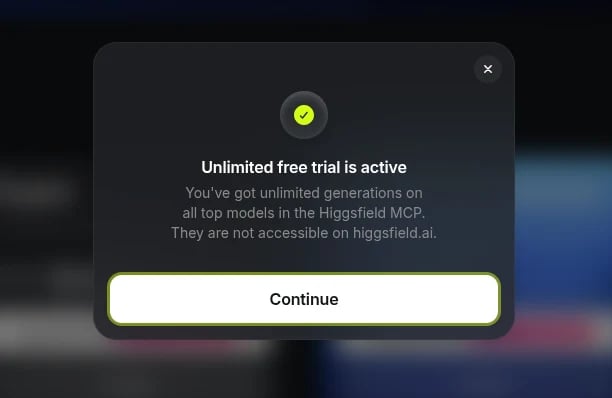
Once it's active, an "Unlimited free trial is active" window pops up. It spells it out clearly: unlimited generation only works through Higgsfield MCP, not on the higgsfield.ai website.
Your account page also shows how many trial days are left, when it expires and the price afterward. It adds one more line: unlimited generation is only available through the Higgsfield MCP in Claude and ChatGPT. The official wording says "Claude", but in my testing only the claude.ai web app worked. More on that below.
After you sign up, the first thing to do is cancel auto-renewal. The Higgsfield links in this post are my affiliate links, so if you forget to cancel and get charged, I earn a commission. But I'd rather you try it, decide it's genuinely useful, and then choose to subscribe, not get charged because you forgot. See "How to cancel your Higgsfield subscription" below.
Step 2: Add Higgsfield as a custom connector on claude.ai
The Higgsfield MCP has to be added as a custom connector. The server URL is:
https://mcp.higgsfield.ai/mcp- Open claude.ai in your browser, go to "Settings → Connectors" and click "Add custom connector".
- Enter
Higgsfieldas the name and the URL above. - Click Add, then "Connect", and sign in with the Higgsfield account you just activated the trial with.
The easier way: on higgsfield.ai, click "MCP" in the menu to open the official MCP page, then click "Add Higgsfield to Claude". It opens claude.ai's add custom connector dialog with the name and URL already filled in. Just click Add, then Connect.
Watch out: don't install the Higgsfield AI connector from the connector directory. You'll find one with the same name there, but its tool list has nothing for generating videos or images. It's for importing videos into the Higgsfield media library.
Step 3: Generate a Seedance 2.5 video on claude.ai
Once you're connected, open a new chat and upload your reference images. Start the message with "Please use the Higgsfield MCP to call SeedDance 2.5 to make a video", then follow with your video description.
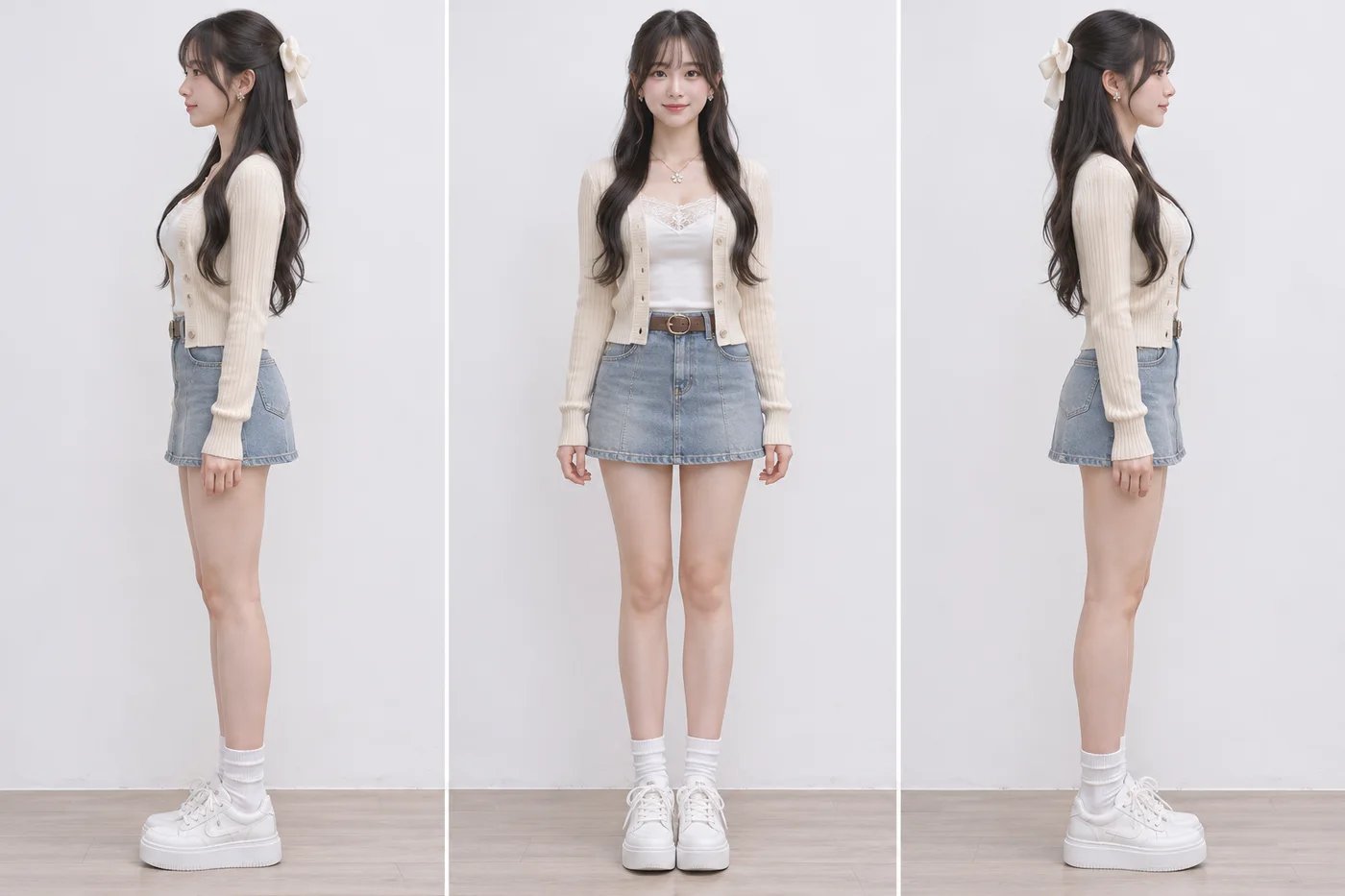
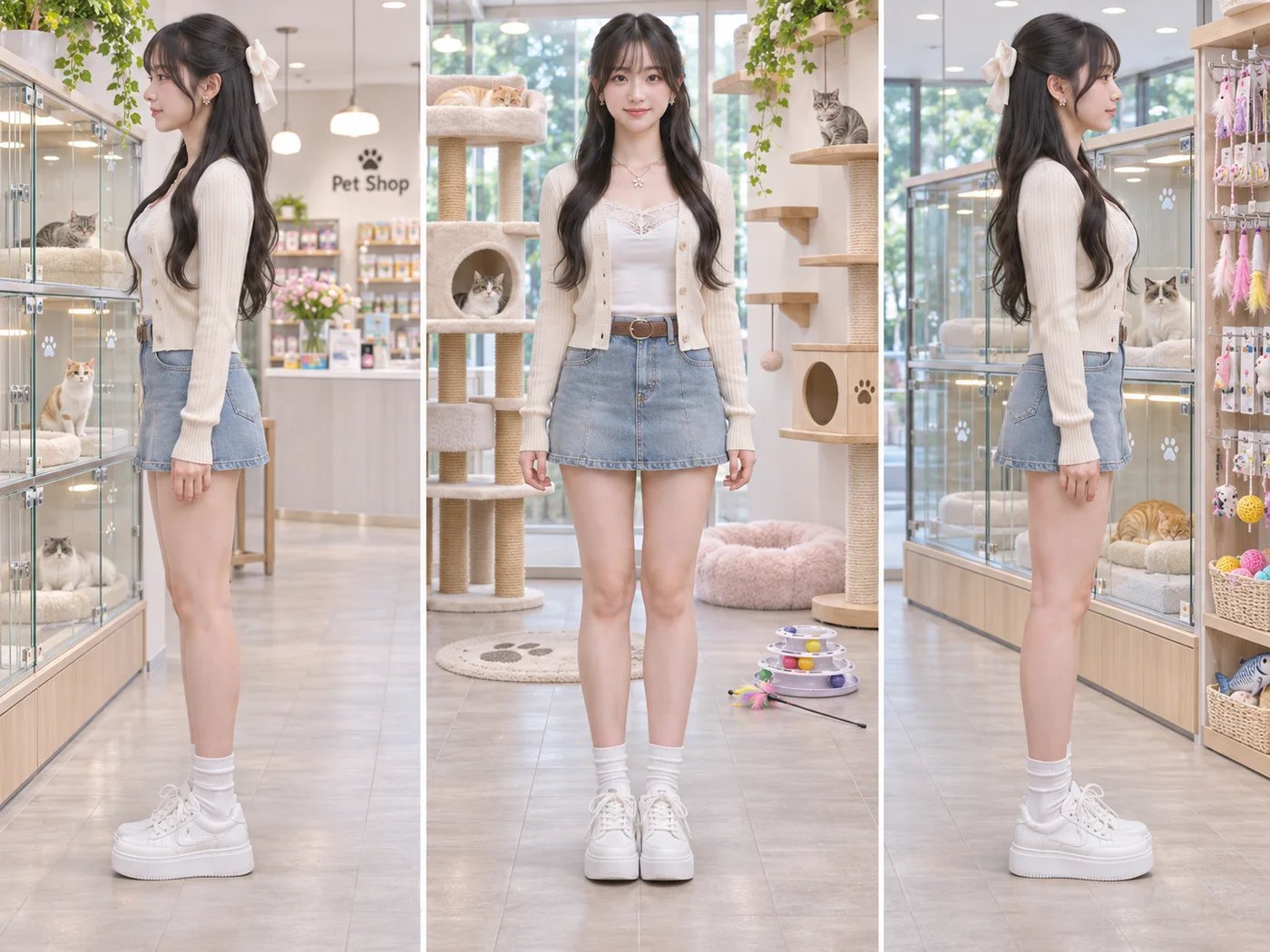
I used two reference images this time:
I split the prompt into sections:
- Subject: Image 1 is the character reference, keeping the facial features, hairstyle, outfit and accessories consistent.
- Setting: a bright pet shop; the reference images only guide the look and don't lock the first frame.
- Music: rhythm, genre, BPM, and which moves should land on the beat.
- Camera and editing: front-camera selfie, handheld shake, hard cuts as the phone drops and comes back up.
- Shot breakdown: what to show in the opening, the middle and the ending.
- Image quality: the phone’s front-camera look I wanted, and no text watermarks.
Here's the full prompt I actually sent (I wrote it in Chinese; this is an English translation). Feel free to copy it and adapt it:
Please use the Higgsfield MCP to call SeedDance 2.5 to make a video.

Subject: Image 1 is the character reference. Keep the facial features, hairstyle, outfit and accessories strictly consistent.
Setting: a bright pet shop interior (glass cat enclosures, an open cat tree, cushions and cat toys visible); replace the white wall with the pet shop environment. Use the reference images only for the character's appearance; do not lock the first frame.

Music: generate an original R&B-pop track with female vocals, a clear rhythm and flirty tension, about 100-108 BPM, low bass plus short, punchy electronic drums. Raising/lowering the phone, sudden face close-ups and bending down/straightening up all land on the beat. Layer in fabric rustle, hair flicks, close breathing sounds, soft laughs, gentle cat meows and scratching, and pet shop room tone.

Camera and editing (key): do not use a single smooth, continuous take. She films herself with the phone's front camera and always holds it, but there is a clear sense of camera interaction and cutting along the way. The phone can suddenly drop (the frame briefly falls to a medium close-up of her chest / waist / thighs, with the framing wobbling), then suddenly come back up to a face close-up. You can also hard-cut or quick jump-cut between a tight facial close-up and a slightly wider medium close-up. Every time the phone comes back up, the viewer should feel extremely close to her. No stabilizer at any point; random handheld shake. No dialogue or speaking motions.

Shot breakdown:
1. Opening medium close-up: frame her from the waist up as she stands in front of the cat tree. Her white, short-sleeved ribbed top with a deep U-neck subtly reveals the edge of her inner layer and the natural contours of her neck and chest as she breathes. She shifts her weight left and right; the phone starts low, filming her body and the cats around her.
2. Suddenly bends down to pet a cat: she leans forward naturally, reaching toward a cat on a cushion and stroking it gently. With the handheld shake the frame drops to a medium close-up of her waist and legs, and the cat lifts its head to rub against her hand. On the next beat she suddenly lifts the phone back up close to her face; the front camera is instantly right on her eyes, nose tip and lips. Her refined makeup (pink-coral lips, soft eyeliner, loose strands against her cheek) fills the frame, and her expression switches between shy and teasing: first she lowers her eyes and presses her lips together, then looks up and fixes her gaze on the lens, tilts her head slightly, blinks softly and gives a barely perceptible smile.
3. Drops again or pulls back slightly: back to chest-up, or she bends a little again to keep petting the cat, flicks her hair, turns her head to look at the cat. On the next beat she jerks the phone back up close to her face, catching the change in her expression. You can intercut one extreme close-up of her lower face / lips, or a brief extreme close-up of the cat interacting with her fingers.
4. End on a tight facial close-up: a flirty locked gaze and the rise and fall of her breathing, with the cats and pet shop still visible in the background.

Strict image-quality requirements: real footage from a phone’s front camera with a Douyin influencer beauty filter. The beauty filter softly brightens the skin, but the midtones and shadows still have fine random grain and a little chroma noise. Clear motion blur and brief focus loss when raising/lowering the phone, flicking hair and bending down. Focus breathing, rolling shutter, exposure and white-balance pumping, noise-reduction smearing; facial features recognizable but not sharp everywhere. 720p. Avoid text watermarks, grainless footage, uniform sharpness throughout, HDR, studio retouching and the smooth motion of a stabilizer.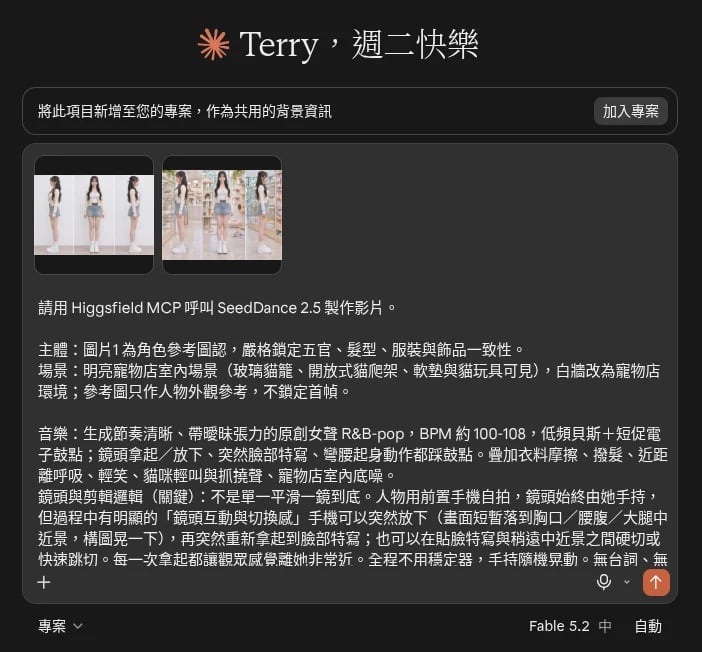
After you send it, Claude first uploads the reference images, confirms the model settings, then submits the job. A higgsfield.ai · generate_video panel appears in the chat showing the job in the queue, and the finished video appears right there.
This run used Seedance 2.5, 15 seconds, 9:16, 720p, with native audio. Claude also replied explicitly that it had been "submitted using the free credits", and the free credits could be used until 11/27.
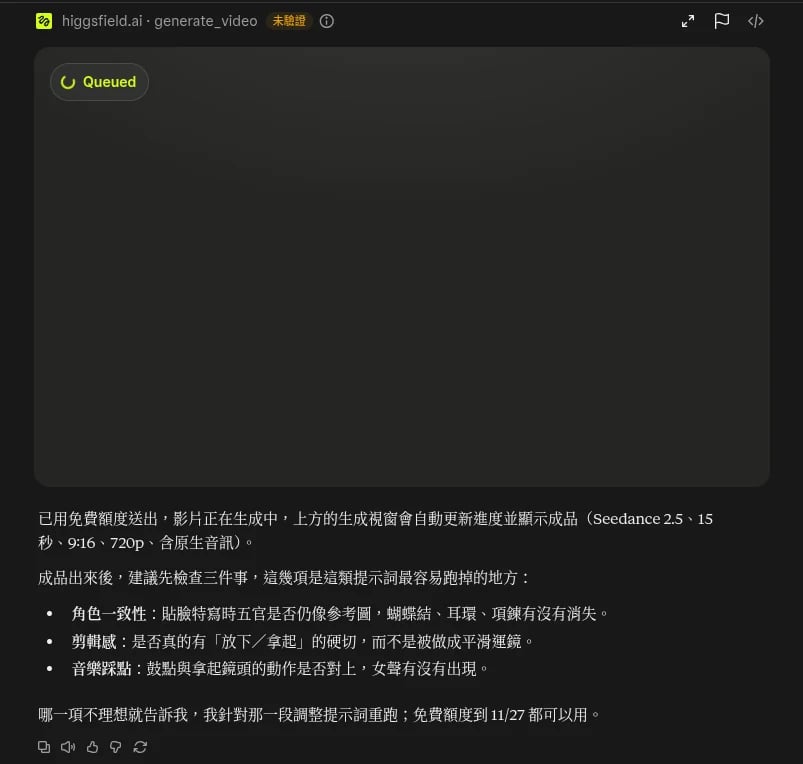
The unverified label appears because this is a custom connector I added myself, not one installed from the directory.
Here's the generated video (Seedance 2.5, 15 seconds, 9:16, 720p, with native audio):
The outfit, hairstyle and accessories all carry over from the reference images: the cream knit cardigan, lace inner layer, denim miniskirt, flower necklace and bow hair clip. The setting is a pet shop with a cat tree, cushions and cats, and the camera switches between chest, waist and face close-ups, close to the "drop / lift" rhythm the prompt describes.
Why it has to be the claude.ai web app
I first ran the same instruction in Claude Desktop. It could call Higgsfield's tools, but it didn't use the free trial. Instead, it started by estimating how many credits the video would cost.
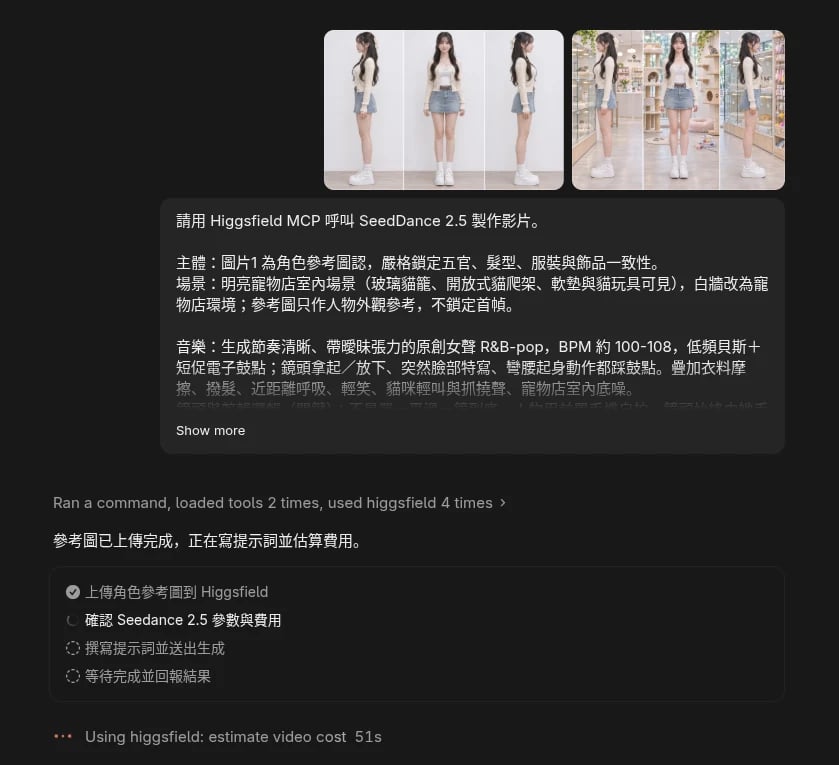
Claude Code (CLI) was the same: no free trial. When I switched to a chat in the claude.ai web app, the same prompt was submitted straight away with the free credits.
So if you want the 3-day unlimited trial, open claude.ai in your browser. Don't use Claude Desktop or Claude Code.
Downsides of the Higgsfield free trial: think before you sign up
This post contains Higgsfield affiliate links, but I still want to be upfront about the downsides:
- The free credits come with a queue, and sometimes the wait is very long. Trial users all over the world share the same pool of free capacity, so after you submit, the job shows "Queued" first. If you're lucky it starts quickly; if not, you wait a very long time. "Unlimited" doesn't mean "instant", and how many videos you actually get in 3 days depends on the queue.
- You add a card up front, and it charges automatically when the trial ends. The trial is $0, but it automatically converts to Ultra 3K, and the first month costs $75. Forget to cancel and you'll be charged.
- Only the claude.ai web app works. Claude Desktop and Claude Code (CLI) don't get the free trial, and generating directly on higgsfield.ai doesn't count either.
- It's easy to install the wrong connector. The Higgsfield AI connector with the same name in the connector directory can't generate videos; you need to add your own custom connector.
If you just want to try AI video and don't want to risk being charged, or you don't have a video you need to make right now, you can hold off on signing up. If you do want to use it, get your video descriptions ready first, then activate the trial.
How to cancel your Higgsfield subscription (auto-renewal)
When the trial ends it converts to Ultra 3K, and the first month is $75. If you don't want it to renew:
- Log in to higgsfield.ai and open the plan page for your account.
- In the "3-day unlimited MCP trial is active" section, click "Cancel auto-renewal".

The page shows the date your trial ends. My advice stays the same: cancel right after you activate it, rather than waiting until the last day to remember. If you find it useful after the trial, you can subscribe on your own.
FAQ
Can I use Higgsfield for free?
You can try it for 3 days. Once you activate the free MCP trial, you get unlimited generations through the Higgsfield MCP for 3 days. In my tests with Claude, only the claude.ai web app worked. You need to add a credit card for the trial, and it converts to a paid plan automatically when it ends.
Is there a queue on the Higgsfield free trial?
Yes. Trial users around the world share the same queue for free generations, so jobs show "Queued" after you submit, and sometimes the wait is very long. How many videos you actually get in 3 days depends on the queue.
Can I use Seedance 2.5 for free?
During the trial, yes. Seedance 2.5 is one of the models in the Higgsfield MCP free trial, so for 3 days you get unlimited generations through the Higgsfield MCP in the claude.ai web app, but you'll have to wait in the queue, and you have to pay once the trial ends.
How much does it cost after the trial?
As of 2026-11-24: the trial automatically converts to the Ultra 3K monthly plan, $75 for the first month and $129 per month from the second month on. If you don't want it to renew, cancel before the trial ends.
Which models can I use in the free trial?
The plan page lists GPT Image 2 / 2.5 / 2.6, Seedance 2.0, Seedance 2.5, Speech 2.8 HD, VibeVoice, Seed Speech, Seed Audio 1.0 and more; the page itself says "all top models".
Can I use the Higgsfield free trial in Claude Desktop or Claude Code?
Not in my testing. When Claude Desktop or Claude Code (CLI) called Higgsfield, it estimated how many credits the video would cost instead of using the free trial. Jobs were submitted with free credits only when I used claude.ai in a browser.
Wrapping up
The Higgsfield MCP free trial is generous: 3 days of unlimited generations with top models like Seedance 2.5 and GPT Image. But the free credits come with a queue that can be long, and you have to add a card that gets charged automatically when the trial ends. If you want to sign up, get your video descriptions ready first, and once it's active, make canceling auto-renewal the first thing you do.
What have you made with the Higgsfield MCP? Come share it with me on Threads or X.