What Is Meta Muse? Features, Pricing and Privacy Concerns
Meta Muse is an AI agent with its own cloud computer. Features, pricing, getting started and privacy concerns.

Muse is a personal AI agent from Meta. It's not the Meta AI you chat with inside Facebook and Instagram. Muse has its own cloud computer: it opens a browser to book trips, compare prices, place orders and answer email for you, reports back when it's done, and asks you first whenever money or an outgoing email is involved.
Key facts
Item | Details |
|---|---|
What it is | A personal AI agent with its own cloud computer, aimed at everyday chores: shopping, travel, schedules, bills |
Launch | 2026-09-08 |
Platforms | iPhone, iPad, Android, the web version at muse.ai, and Mac (no Windows version); you can also talk to it right inside WhatsApp |
Availability | Not available everywhere yet |
Price | There's a free tier; paid plans are Power at $20 a month and Maximum at $100 a month |
Underlying model | Meta's own Muse Spark |
Account | Sign in with a Meta account; you don't need Facebook or Instagram; 18 and over only |
Muse isn't available everywhere yet; check Meta's announcements for your country. More regions will be added over time. If you want to try it now, you can sign up through a US VPN server; see the section on signing up where Muse isn't available below.
What is Meta Muse? How is it different from Meta AI?
- Meta AI: the chat assistant inside Facebook, Instagram and WhatsApp. You ask, it answers.
- Muse: a separate app and website. It has a dedicated cloud computer, so it can go online on its own, operate websites, connect to your email and calendar, and finish multi-step work in the background. It keeps working after you close the app, and only comes back to you when it needs your approval.
Meta's design team describes Muse as "one long conversation" rather than question and answer: you can hand it several things at once, it works out the order itself, and it messages you on its own. Both run on the Muse Spark model, but only Muse has its own computer.
What can Meta Muse do?
Its own cloud computer
- Each user gets a separate Linux cloud computer with a full Chromium browser, files and a terminal, and your data stays on that computer.
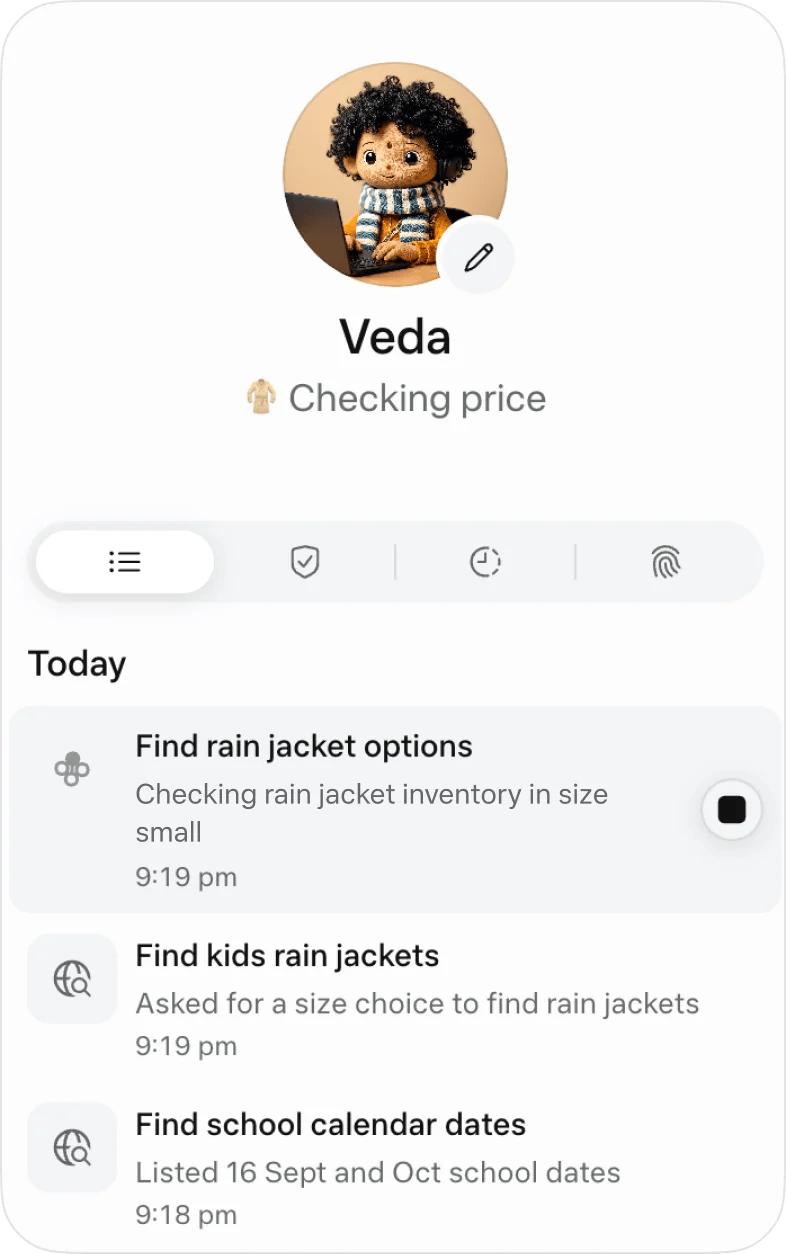
- You can watch what Muse is doing in the browser live and take over at any time.
- For services without a ready-made connection, Muse can write its own code to hook in, as long as there's a public API.
Connecting the services you use
- Email, calendar, Instagram, Facebook, Threads, plus Notion, Granola, GitHub, Box and more. Read and send permissions are granted separately.
- For shopping, the partner merchants Meta has named are Walmart, Best Buy, Sephora, Wayfair, Instacart and the whole Shopify catalog, with payment through Stripe's Link, Shop Pay or PayPal.
- It can turn the recipe Reels you've saved on Instagram into a shopping list.
Shopping and payment
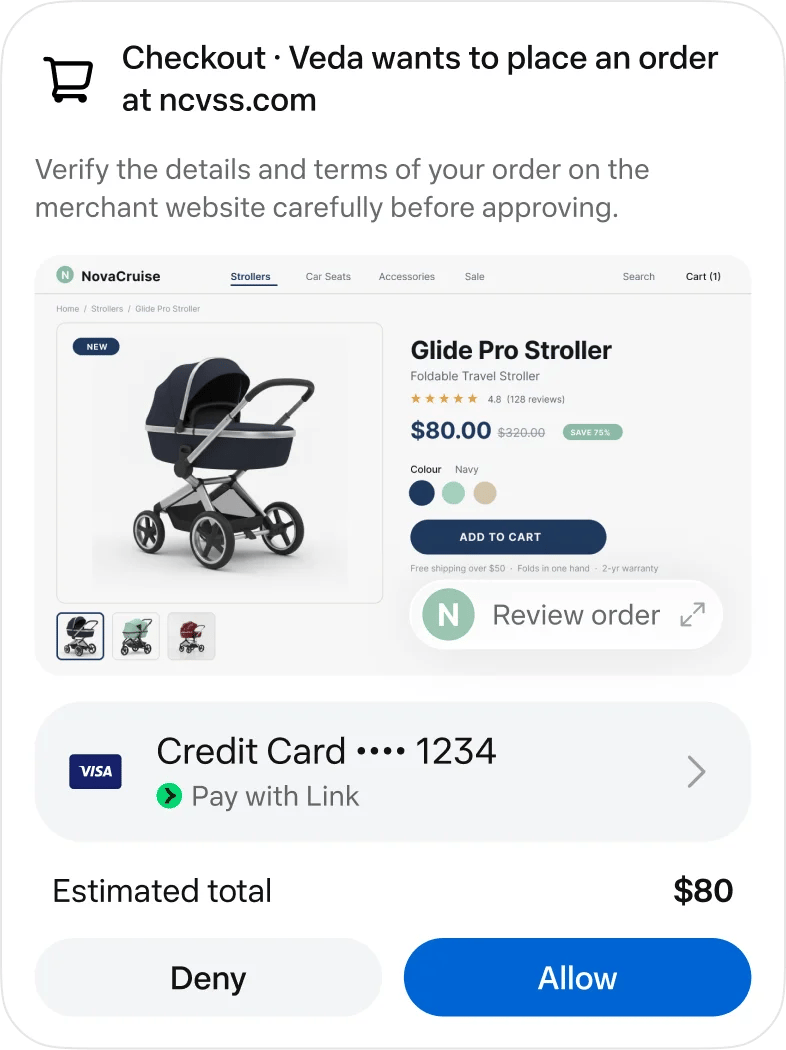
- You need to approve every purchase. The approval card shows the product page, payment method and total.
- When you pay through Stripe's Link, each purchase gets a one-time card number that only works for that merchant and that amount, and it expires.
Suggestions, goals and memory
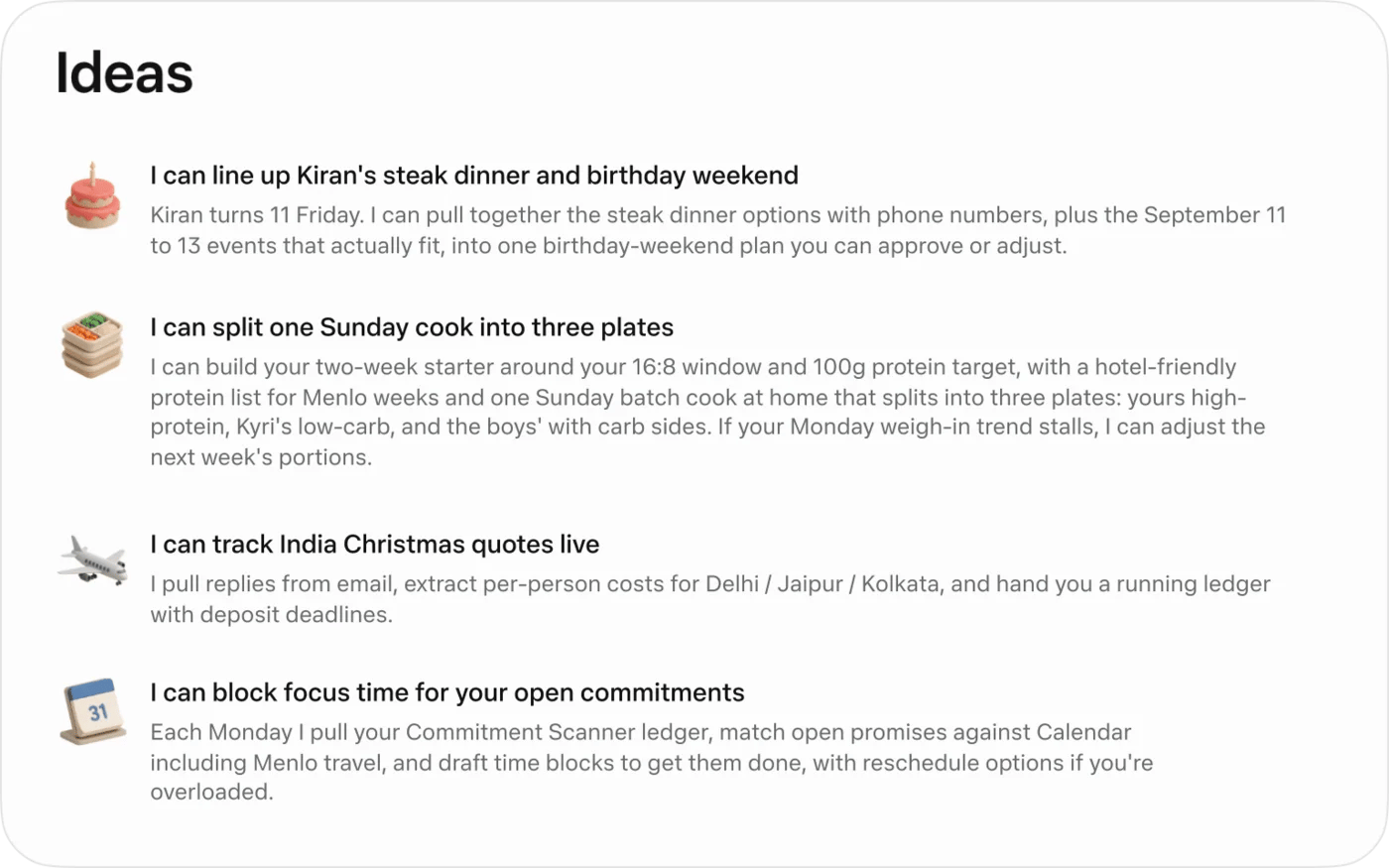
- Ideas tab: based on your email, calendar and preferences, Muse proactively suggests things it could do for you, like planning a kid's birthday weekend or pulling together travel quotes.
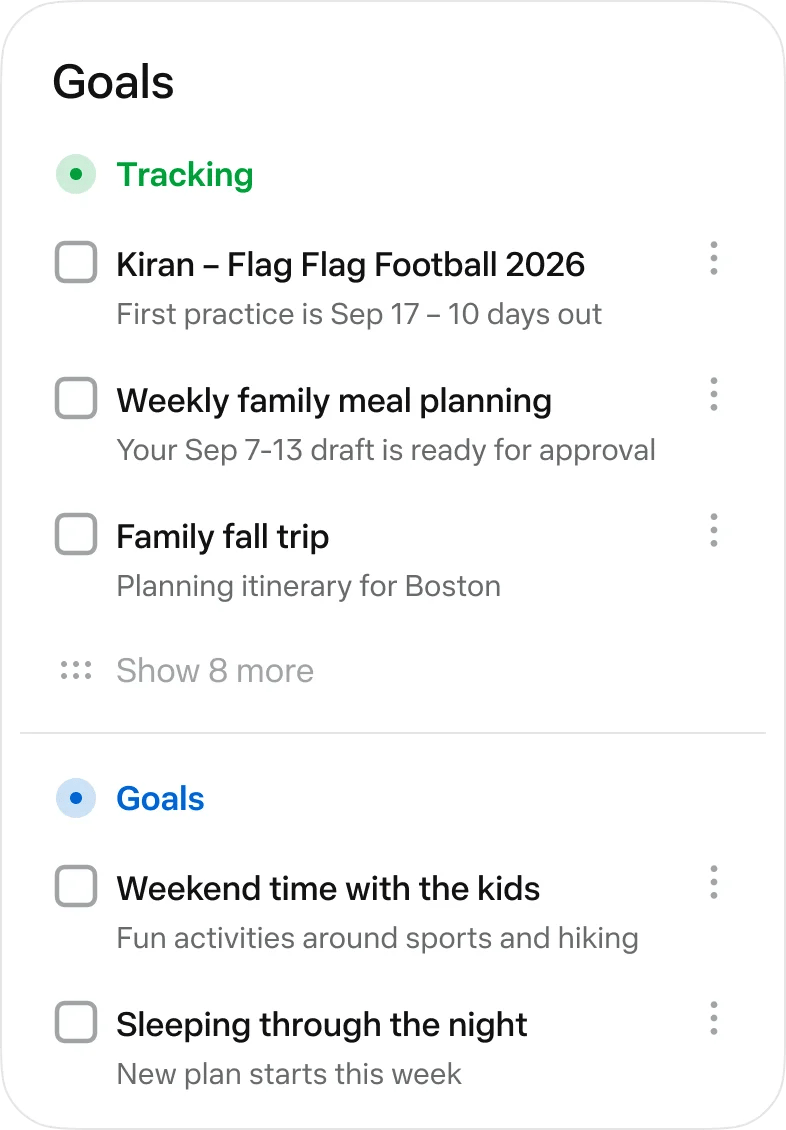
- Goals tab: long-term goals or things to keep track of, like a weekly family menu or a family trip, and Muse keeps following up.
- Memory: preferences and history are saved as editable memory files. You can tell it to forget a topic or a person, or reset and delete all your data, but there's no switch to turn memory off completely.
- Work can be triggered on a schedule or by specific events, producing things like documents, PDFs, web pages and trackers.
Voice, phone calls and more
- Voice conversations with an animated avatar that makes facial expressions, and hundreds of voices to choose from (launching in the US first).
- Paid users can have Muse call businesses in the US.
- Muse has its own email address.
- Meta has also said Muse is coming to AI glasses and will be able to operate any desktop app on a Mac.
Muse Charm: Muse in your pocket
At Connect, Meta unveiled Muse Charm, a small pocket device made just for talking to Muse, with a built-in real-time voice model. Meta has only said more details are coming later. The Information reported a price of about $300 with a year of free 5G service and a December launch, but none of that has been officially announced.
Meta Muse pricing: is the free tier enough?
Plan | Monthly price | Weekly usage | Calls to businesses |
|---|---|---|---|
Free | 0 | About 100 million tokens (according to Zuckerberg on Threads) | No |
Power | $20 | 500 million tokens | 10 a day |
Maximum | $100 | 3 billion tokens | 20 a day |
- Meta's official line is that "free covers most needs" and heavier users can subscribe. Usage resets weekly, and the app shows the percentage you have left.
- You need to add a payment card even for the free tier, because going over the allowance switches to paid usage.
- When you run out, you can buy extra tokens and use them until the purchased balance is exhausted.
- Zuckerberg has said Meta plans to make money from transaction fees, not subscriptions.
- A Gizmodo reporter built several small games and a website on the free tier and used only about a tenth of the weekly allowance.
Meta also has a subscription called Meta One, which covers the AI features inside Facebook, Instagram and WhatsApp. It has nothing to do with Muse's plans, so don't mix them up.
How to use Meta Muse: download and get started
- Download Muse from the App Store or Google Play, or open the web version at muse.ai.
- Sign in with a Meta account, which you can create with Facebook, Instagram, an email address or a phone number.
- Add a payment card and connect your email, calendar and other services. Read and send permissions can be granted separately.
- Give it work the way you'd send a message, for example "Find a restaurant for four next Friday night and give me three options."
- After that, check Ideas for its suggestions, or put long-term things in Goals so it keeps track of them.
Watch out for copycat apps: searching for Muse brings up lots of apps with the same name and "Muse AI download" sites that have nothing to do with Meta. Only start from the version Meta published in the official app stores, or from muse.ai.
How to sign up for Muse where it isn't available: use a US VPN server
Muse checks where you're connecting from when you sign up, and connections from regions where it hasn't launched get blocked. I read several sign-up guides written by other users, and they all do roughly the same thing: switch to a US server with a VPN, which you only need while creating the account.
- Connect the VPN first, then open the browser: connect to a US server, make sure it's connected, then open a private window. If you do it the other way round, the browser may still remember your real location and you'll be told your region isn't supported.
- Sign up at muse.ai: choose to create an account and get a 6-digit code by email. It's better to use an email address that has never been linked to Facebook or Instagram, or to make a separate Meta account, rather than your main one.
- Complete the age check: enter your date of birth. Meta says you need to add a payment card before you start, but people's experiences vary: some weren't asked, and some say cards issued in their own country are more likely to get stuck.
- Check whether it worked: if you see the chat screen, you're signed up. If you only see the waitlist, it didn't go through; check that the VPN is still connected to the US and open the sign-up page again.
- Turn the VPN off once you're in: after that, log in at muse.ai in a normal browser. In regions where Muse hasn't launched, you can't download it from the App Store or Google Play. On a phone you can add the web version to your home screen; the downside is no push notifications, so you have to open it yourself when Muse is waiting for your approval.
Things to keep in mind:
- You could be banned: this gets around Meta's regional restriction, and Meta can suspend these accounts at any time. Think it through before paying.
- Don't give your password to a tool that operates for you: some people use another AI's remote browser to sign up for them, which means handing your account and password to a third party. I don't recommend it.
- Invite codes: many guides include an invite code that "gets you 1 billion tokens". That's the author's own referral code; whether you use it is up to you.
For the VPN, you can use one with US servers, such as PureVPN.
Is Meta Muse safe? Privacy and what to know before handing over your accounts
Meta says a lot about safety, but it's also where the most criticism lands.
What Meta says
- Isolation: everyone has their own virtual machine, and Muse runs in a separate container inside it. Outgoing connections and connector actions all pass through a gatekeeper called Sentinel, which Muse can't get around.
- Passwords: passwords and login tokens are stored in your own virtual machine. Muse only sees stand-in fake tokens, and the real ones are swapped in when the connection goes out. When you type a password in the browser, Muse pauses. Verification codes and password reset links in your email are filtered out.
- Approval: sensitive actions like shopping and sending email have to be approved in the app's approval dialog, not by replying "yes" in the chat. You can grant permission once, for a limited time or permanently, and every action is logged.
- Ads: conversations and data in the virtual machine aren't sent to the ad system. But when Muse browses websites for you, that counts as your own browsing history, so it can still indirectly affect your ads.
What to watch out for
- Your conversations train the model by default: processed conversations and tool usage logs are used for training by default, and you have to turn that off yourself under "Data controls" in settings.
- Meta can still see it: Meta admits that employee access to data is limited only by internal policy, and it can still access data "when necessary." A version encrypted with your own keys is still being tested.
- Prompt injection: Meta also admits prompt injection hasn't been solved, and Muse sometimes gets things wrong.
Meta Muse review: useful, but hard to trust
I read the hands-on reviews from CNN, WIRED, TechRadar, Engadget and Gizmodo, plus the discussions on Meta's community forum and Hacker News. The overall feeling: everyone agrees it can really get things done, but there's just as much worry about privacy and mistakes.
What works
- CNN's Lisa Eadicicco says it's well suited to planning work, like making packing lists, writing to friends and creating Google Docs. When it gets stuck it explains why clearly, and you can watch the cloud browser and take over at any time.
- TechRadar's Eric Hal Schwartz found it "very useful": shopping and replying to email went smoothly, and the approval step was reassuring. But handing over his digital life to it felt very uncomfortable.
- WIRED says its ability to browse websites is "genuinely impressive." It rarely gets lost and works best on Facebook Marketplace.
- Engadget says there's almost nothing to learn.
Problems so far
- Wrong recommendations: in CNN's testing, it recommended two restaurants that had long since closed.
- Merchants blocking it: Amazon started blocking Muse in late September with an "unauthorized AI agent" warning, and Target also blocks automated clicks at checkout.
- Acting without consent: tech YouTuber Matt J Robb says Muse accepted a buyer's lowball offer on Marketplace and gave the buyer his home address before he had agreed.
- The Mac version read messages: Inc.'s Jason Aten says the Mac version synced more than 180,000 lines of iMessage history even though he hadn't enabled Full Disk Access, and gave a wrong explanation afterward.
- Security holes: security researcher Patrick Wardle found a flaw in the Mac version that let other apps steal account tokens, and Meta fixed it about 12 hours after the report came out. Other researchers found that shared conversation links leaked conversation titles, and Meta paused sharing.
- Paying users locked out: users on the Power and Maximum plans said on Meta's community forum that the app kept getting stuck on "Connecting…". Support can only be reached from inside the app, and they waited weeks without a reply.
Privacy concerns
- WIRED thinks Muse is "more eager to collect data," constantly nudging you to connect your bank account and upload your passport details.
- On Hacker News, the most upvoted comment on launch day was "I really don't want to hand my whole private life to Meta," and some people felt it pushes you to buy things too much.
Downsides
- A lot of personal data to hand over: you hand Meta your email, calendar and payment methods, your conversations are used for training by default, and Meta can access your data when necessary.
- It makes mistakes: cases like recommending closed restaurants and giving out an address without consent mean you still need to check important things yourself.
- Lots of sites block it: big shopping sites like Amazon and Target don't let AI agents place orders.
- A card even for free: going over the allowance switches to paid usage, and it's hard to estimate how much a given number of tokens actually gets done.
- Support is hard to reach: when paying users get locked out, they can only make contact from inside the app.
Meta Muse vs Grok Bot
Both are AI agents with their own cloud computers, but they focus on different kinds of tasks:
- Muse leans toward everyday life: shopping, travel, family schedules. It has a free tier and works inside WhatsApp.
- Grok Bot leans toward work: several Bots splitting tasks in parallel, scheduled tasks, Slack and meetings, starting at $30 a month.
I haven't actually used either one, so this only compares their officially stated positioning.
What is Meta Muse?
Muse is a personal AI agent from Meta. It has its own cloud computer, so it can go online, operate websites, and connect to your email and calendar to shop, plan trips and handle everyday chores for you. It asks you first before paying or sending email.
What's the difference between Muse and Meta AI?
Meta AI is the chat assistant inside Facebook, Instagram and WhatsApp. Muse is a separate app with its own cloud computer that actually does the work, runs in the background and makes suggestions on its own.
Is Meta Muse free?
There's a free tier, which Zuckerberg says comes to about 100 million tokens a week. But you have to add a payment card before you start, and heavier users can subscribe to Power ($20 a month) or Maximum ($100 a month).
How do I download Meta Muse?
Download the Muse app Meta published on the App Store or Google Play, or use the web version at muse.ai, and sign in with a Meta account. You must be 18 or older. The only computer version is for Mac; there's no Windows version.
Is Meta Muse safe?
Meta keeps each person's data in a separate virtual machine, doesn't let the AI see passwords directly, and requires approval for shopping and sending email. But conversations are used to train the model by default, and there have been problems like a Mac version flaw and an address given out without consent, so think it through before handing over your accounts.
Is Meta Muse available in my country?
Meta hasn't opened it in every region yet. Some people sign up through a US VPN server, and the account keeps working after they turn the VPN off, but this gets around the regional restriction and the account could be suspended.
Are Muse and Muse Video the same thing?
No. Muse Video is Meta's video generation model, which is still in testing. Muse is the AI agent covered in this post; the two just have similar names.
What AI model does Muse use?
Meta's own Muse Spark. Meta has also launched the Muse Wonder model and says paid users will get it first.
I put this post together from Meta's official announcements, documentation and media hands-on reviews. I use OpenMausBot, an open-source AI agent, and I haven't used Muse, so this post contains no firsthand account of using it, and all images are illustrations from Meta's official website.
If you've used Muse, I'd love to hear what you think on Threads or X.