Concat, a Free AI Video Editor: Text to Speech and Auto Captions
Concat is a free, open source CapCut alternative with no watermark. I tested its text to speech, auto captions and Claude editing over MCP.

Concat is a free, open source video editor. No watermark, no account, and your videos never get uploaded. Auto captions, background removal and AI voiceover all run on open source models on your own computer.
I tested it on a Linux laptop with an Intel Core Ultra 5 322 (integrated graphics only, no discrete GPU). I took the 15-second vertical video I generated with Seedance in my Higgsfield MCP free trial guide and turned it into a short with English narration, captions and a title. I used Concat’s built-in Mark voice for the narration and its auto captions for the subtitles. Claude handled the cutting, layout and export through MCP:
Test results
Item | Result |
|---|---|
AI voiceover (built-in Mark voice) | 248 seconds to generate 6.76 seconds of narration (no discrete GPU, CPU only) |
Auto captions (Whisper small, English) | About 22 seconds for 6.8 seconds of English narration, two proper nouns misheard |
Claude editing through MCP | Creating the project, adding titles and captions, layout and export all work; the 15-second video exported in 2.5 seconds |
Model downloads | Voice model 1124 MB, each caption model 488 MB; downloaded on first use, offline after that |
Checked on 2026-11-26.
What is Concat? Can you use it commercially?
Concat is built in Rust by Jareer Abdullah. It runs on Windows, macOS, Linux, Android and iOS, and the interface comes in 27 languages. All features are free.
The license is AGPL-3.0. You can use the videos you make with it commercially; AGPL only applies to distributing or modifying Concat itself.
For editing, you get multitrack editing, keyframes, speed curves, 100+ effects and transitions, and export to H.264, HEVC and AV1 at up to 4K 60fps. The AI features are auto captions, vocal separation, AI voiceover, background removal, video restoration and stabilization.
Tested: AI voiceover (text to speech)
On first use, go to Settings → Speech and download the voice model (Studio voice, 1124 MB). After that, Audio → Voices lists four built-in voices: Elizabeth, Mark, Ruth and Bob.
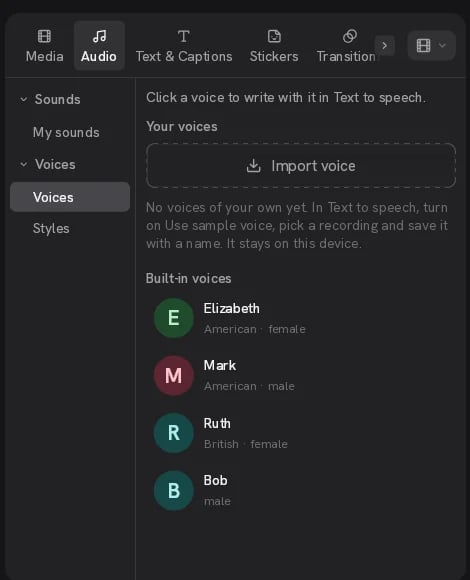
In the Text to speech panel, paste your script, pick a voice and click Generate speech. You can add [laugh], [chuckle] and [sigh] to the script. Turn on Use sample voice to clone a voice from a recording.
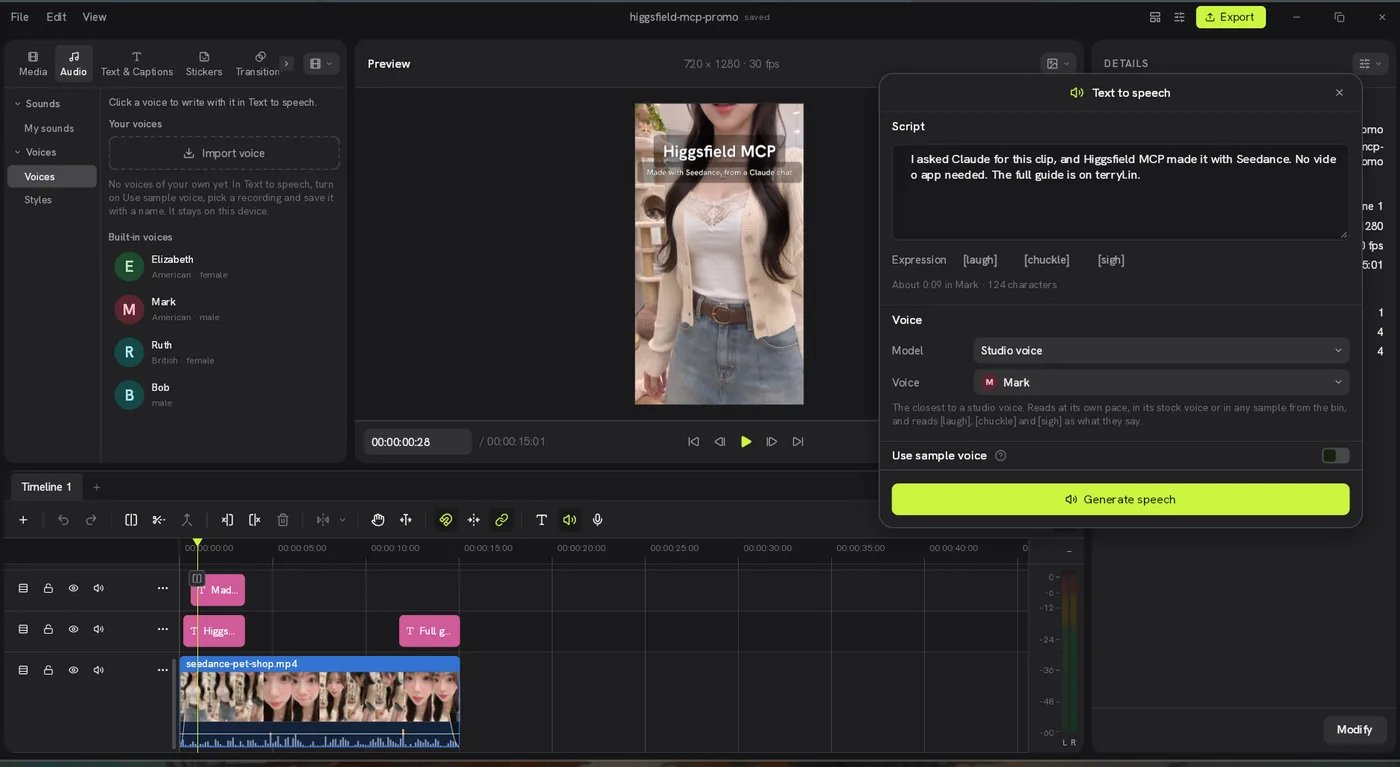
I had Mark read a 124-character English script:
- Speed: 248 seconds to generate 6.76 seconds of audio, so about four minutes per line. This laptop has no discrete GPU, so the voiceover runs on the CPU only.
- Accuracy: I checked the audio with Whisper. Every word was right.
- Language: The model, Chatterbox Turbo, supports English only.
- Placement: The generated audio goes straight onto the timeline at the playhead’s position.
Tested: auto captions
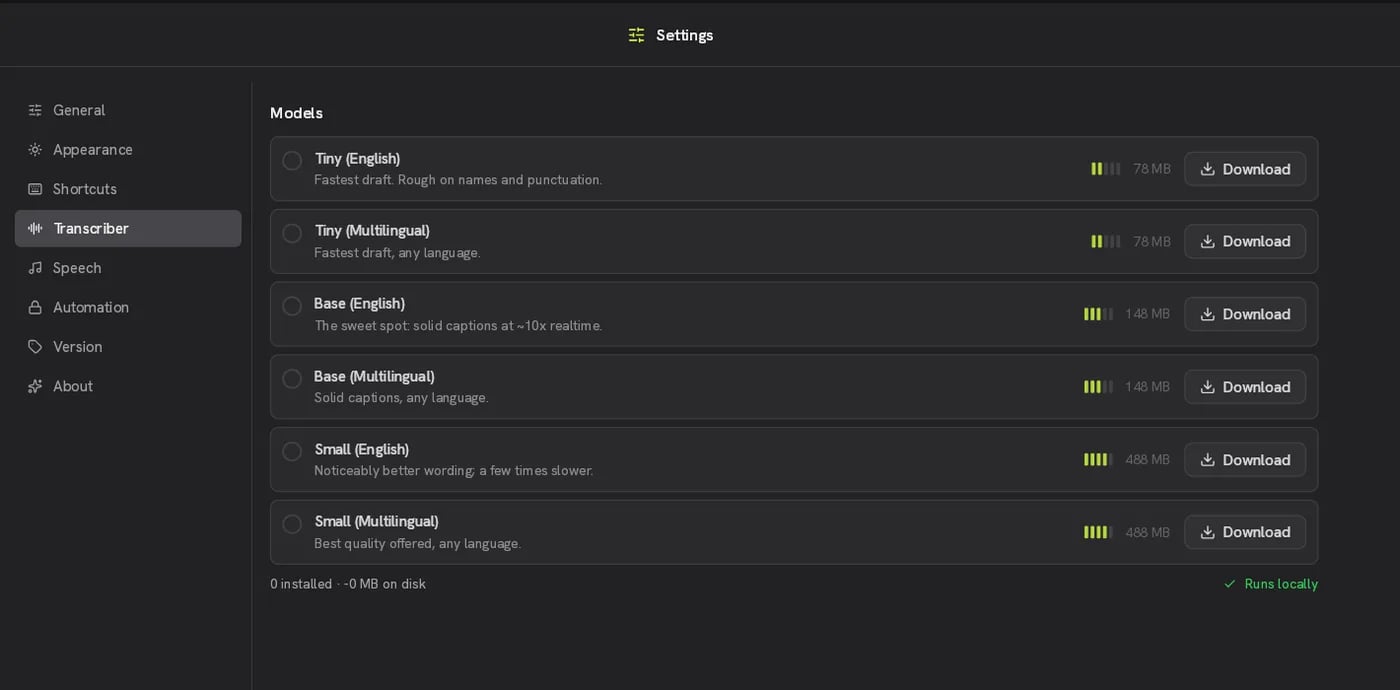
First, go to Settings → Transcriber and download a Whisper model. The largest is small, with an English version and a multilingual version:
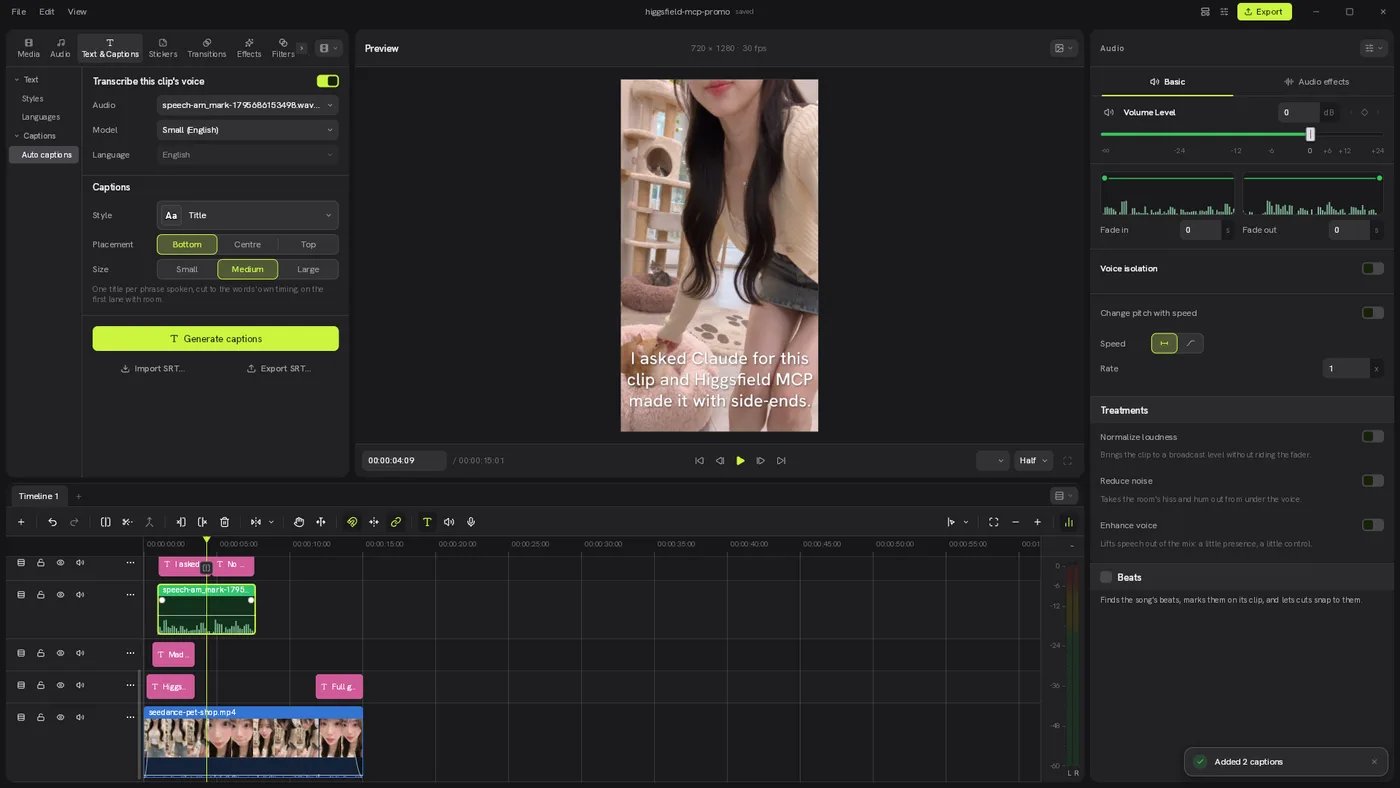
In Text & Captions → Auto captions, turn on Transcribe this clip's voice, choose the audio, model and language, and click Generate captions. Here's the result for the English narration:
English narration (Small English) | |
|---|---|
Narration length | 6.8 seconds |
Captioning time | About 22 seconds |
Misheard | Seedance → side-ends, terryl.in → Terrell.in |
- Regular sentences: All correct.
- Proper nouns: Product names and URLs came out wrong, so always proofread.
- Caption style: By default, each caption contains a full sentence and covers a lot of the frame. You'll want to change it.
Let Claude edit videos with MCP
Concat has a built-in MCP server. In Claude Code, one line adds it (replace the path with the path to your Concat executable):
# macOS
claude mcp add concat -- /Applications/Concat.app/Contents/MacOS/concat --mcp
# Linux (.deb, .rpm, Arch packages)
claude mcp add concat -- /usr/bin/concat --mcp
On Windows, the executable is at %LOCALAPPDATA%\Programs\Concat\concat.exe or C:\Program Files\Concat\concat.exe.
Tested: Claude edits a short video
For the short above, Claude did this through MCP:
- Created a 720×1280, 30fps vertical project and imported the video.
- Added an opening title and subtitle with pop and rise entrance animations.
- Replaced the auto captions with short-phrase captions (timed to each word with Whisper), highlighted keywords in neon green, and fixed the misheard proper nouns.
- Added two chat bubbles in the gap after the narration, slowly zoomed the frame in by 5% with keyframes, and ducked the original audio under the narration.
- Used
preview_frameto render frames and check that no text covered the face. - Exported an H.264 mp4. The 15-second video exported in 2.5 seconds.
Limits I ran into:
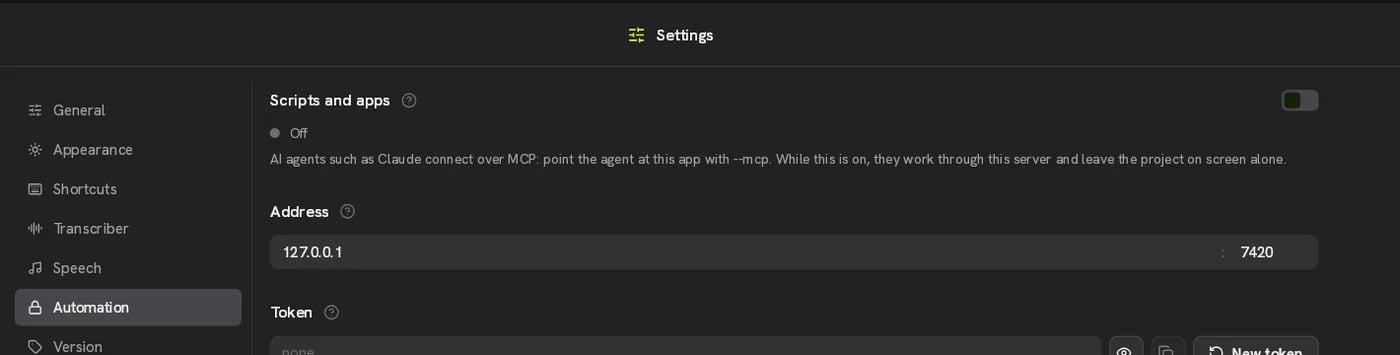
- AI voiceover and auto captions can't be done through MCP. You have to click them in the window.
- Without layout instructions, it looks like a template. With the default styles, captions are three-line full sentences and titles sit on a gray-black plate. Spell out the font, size, position and accent color to get something that looks good.
- Write access is restricted. Exports outside the allowed folders are rejected. To allow more, set
CONCAT_MCP_ROOTS. - It won't touch the project on screen. MCP can edit with no window open; a project that's open in the window is locked, and the agent can't open it.
Which AI models does Concat's AI video editor use?
They're all small, off-the-shelf open source models. I put this together from Concat's third-party license notices and model list:
Feature | Model | Parameters | File size | License |
|---|---|---|---|---|
Auto captions | Whisper tiny / base / small | 39M / 74M / 244M | 78–488 MB | MIT |
Speech detection | Silero VAD | About 260K | Built in | MIT |
Voice denoising | DeepFilterNet 3 | About 2.1M (estimated) | Built in | MIT / Apache-2.0 |
Vocal and music separation | Spleeter 2stems | About 9.8M each (estimated), two models | About 20 MB each | MIT |
Beat detection | Beat This! (small) | About 2M | Built in | MIT |
Text to speech, voice cloning | Chatterbox Turbo (quantized) | 350M | About 1.1 GB | MIT |
Portrait background removal | Robust Video Matting (MobileNetV3) | 3.75M | 15 MB | GPL-3.0 |
Object background removal | IS-Net | About 44.7M (estimated) | 179 MB | Apache-2.0 |
Brush-select background removal | SlimSAM-77 | Image encoder 5.7M, about 10M total (estimated) | About 40 MB | Apache-2.0 |
Fallback background removal without a downloaded model | MediaPipe Selfie Segmentation | Not published | Built in (about 250 KB) | Apache-2.0 |
Video restoration, upscaling | Real-ESRGAN (general x4v3) | About 1.2M (estimated) | 5 MB | BSD-3-Clause |
"Estimated" means there's no official figure. For DeepFilterNet 3, I added up the weights in the official ONNX file; the others are converted from ONNX file size. All other figures come from official READMEs, model cards or papers.
Apart from Chatterbox Turbo at 350M, everything is a few dozen M or less, which is why it all runs locally. I also tested Chatterbox in my Kokoro TTS vs Chatterbox TTS comparison. The official Python version adds an invisible watermark to generated audio; the ONNX version Concat uses doesn't.
Download and install Concat for free
Download it from the official site or GitHub Releases:
Platform | Installer |
|---|---|
Windows | .exe or .msi, x86_64 only |
macOS | One .dmg each for Intel and Apple silicon |
Linux | .deb, .rpm, AppImage, Arch package |
Android | .apk |
iOS / iPadOS | .ipa, sideloading required |
The installers aren't code signed, so they get blocked the first time you open them:
- Windows: In SmartScreen, click More info → Run anyway.
- macOS: Run
xattr -dr com.apple.quarantine /Applications/Concat.appin Terminal.
Concat's drawbacks
- AI voiceover is slow and English only: On a laptop with no discrete GPU, 6.76 seconds of audio takes 248 seconds.
- Auto captions mishear proper nouns: The largest model is Whisper small. Two proper nouns in my English narration were wrong, so check product names and URLs.
- AI voiceover and auto captions aren’t available through MCP: You have to generate them in the app window.
- Unsigned installers: On Windows and macOS, you have to allow the app manually the first time.
Is Concat a free video editor? Does it add a watermark?
It's free, with no paid features or subscription. Exported videos have no watermark, and you don't need an account (checked 2026-11-26).
Is Concat a good CapCut alternative?
It has editing, captions, background removal, effects and 4K export, which is enough for everyday short videos. The difference is that Concat does everything locally with no account. But its AI voiceover is English only and slow.
Do Concat's AI features need an internet connection?
Only to download the models the first time. After that, auto captions, background removal, vocal separation and AI voiceover all work offline, and your videos aren't uploaded.
Can Concat auto caption languages other than English?
Yes. The multilingual version of Whisper handles other languages, but the largest model is small, so proofread before you export.
Can Claude edit videos in Concat automatically?
Yes. Run claude mcp add concat -- <path to Concat> --mcp in Claude Code, and Claude can create projects, cut, add captions and export videos. AI voiceover and auto captions still have to be done in the window.
Can I use videos made with Concat commercially?
Yes. AGPL-3.0 restricts distributing or modifying Concat itself, not the videos you make with it.
If you've tried Concat, share your thoughts on Threads or X.