Kimodo: NVIDIA's Free, Open-Source AI Animation Generator for 3D Characters
Kimodo: NVIDIA's free, open-source AI animation generator. Type a prompt, get 3D character motion, no mocap. Mixamo vs. Kimodo, specs, and a drumming game demo.

When you're making a game with AI, creating the character model is already fast. In my last post, I used Tripo AI to turn concept art into a 3D model in a few minutes. But once the model is done, getting it to move has always been the hard part. Stock animation packs only cover the generic stuff: walk, run, jump, swing a sword. If you wanted a character to "sit on the couch playing a handheld" or "play drums along to a song," you used to have to key it frame by frame in 3D animation software, or put on a motion capture suit and record it.
Kimodo, which NVIDIA released for free as open source this year, is built to fix exactly that. You type a description, and it generates a 3D character animation. No mocap, no hand-keyed keyframes. In this post, I'll cover what Kimodo is, how it compares to Mixamo, how powerful your PC needs to be, what to do if you don't have a graphics card, and finally how a Japanese indie game developer is using this kind of AI animation generator in a real game.
What is Kimodo?
Kimodo is an open-source model that NVIDIA's Spatial Intelligence Lab announced in March 2026. The full name is Kinematic Motion Diffusion: it uses a diffusion model to generate skeletal motion for humans or humanoid robots. It was trained on about 700 hours of commercially usable optical motion capture data. The model weights are on Hugging Face, the code is on GitHub, and the license is the NVIDIA Open Model License.
Put simply, it does text to motion. It's a lot like AI image generation, except it generates the position and rotation of every skeleton joint in every frame rather than a picture. Write "a person slowly walks over, sits down, then stands up and stretches," and it generates the skeleton data for that motion. You can export it as BVH or GLB and use it in Blender, Unity, or Unreal.
Kimodo text to motion: what can you control?
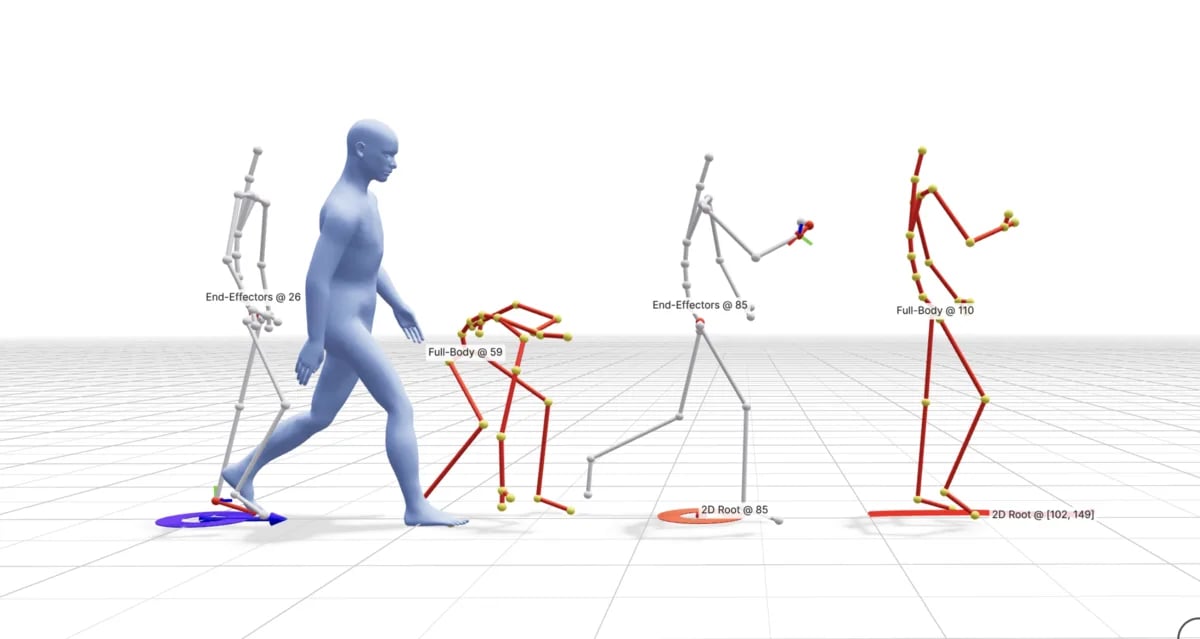
With just one sentence, the motion you get often isn't quite what you pictured. What makes Kimodo practical is that you can write text and add constraints at the same time:
- Text description: what the motion should be. You can write it in segments and generate them one after another.
- Full-body keyframes: set the whole pose for a given frame, for example ending in a seated pose.
- Specific joint positions: constrain only a few joints and let the model handle the rest.
- Hand and foot positions: for example, a hand has to touch a certain point, or a foot has to stay planted.
- A path on the ground: give it a few waypoints or a path, and the character follows it.
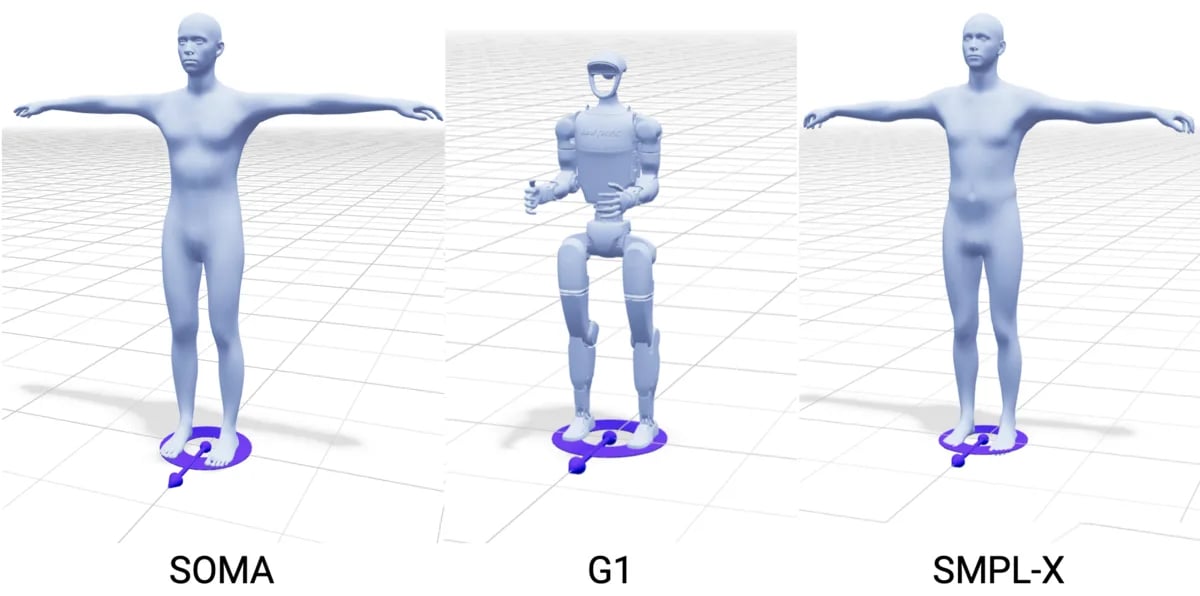
It supports three skeletons: NVIDIA's own SOMA human, the Unitree G1 humanoid robot, and SMPL-X, which is common in research. To use the motion with a typical game rig (a Mixamo rig, an engine's humanoid rig, or the model's own rig), you first need to retarget it to your character.
Kimodo vs. Mixamo vs. motion capture
In 3D animation, character motion usually comes from one of three sources. Kimodo is the third:
Mixamo | Motion capture | Kimodo | |
|---|---|---|---|
Where the motion comes from | Picked from a ready-made library | A real person records it in sensors or in front of cameras | AI generates it from text and constraints |
Want a specific motion? | If the library doesn't have it, you're out of luck | Yes, but you need a space, gear, and a performer | Yes. If you can write it, you can try it |
Cost | Free (needs an Adobe account) | The highest, whether you buy gear or rent a studio | Free and open source, but you need your own graphics card or pay for the cloud |
How reliable the result is | High, everything is pre-recorded | High, but the data needs cleanup | It varies. You often have to generate a few times and fix things by hand |
Mixamo is great for generic motions like walking, running, jumping, and attacking, and it can auto-rig your character too. Kimodo fills in the motions that "aren't in the library and aren't worth a mocap session." You can use both: rig the character in Mixamo first, then export the Kimodo motion from the cloud as an FBX on the Mixamo skeleton, and it goes straight on.
Kimodo system requirements: about 17 GB of VRAM
Kimodo's official docs are pretty direct:
- Graphics card: in practice, it has to be NVIDIA. The most tested cards are the RTX 3090, RTX 4090, and A100.
- VRAM: running everything on the GPU takes about 17 GB, most of it used by the text encoder (Meta's Llama 3 8B). Setting
TEXT_ENCODER_DEVICE=cpumoves text encoding to the CPU and brings it down to under 3 GB, just a bit slower. - OS: developed and tested mainly on Linux. On Windows, Docker is recommended.
- Environment: Python 3.10 or later, PyTorch 2.0 or later.
- Accounts: you need a Hugging Face account and access to Meta's
Meta-Llama-3-8B-Instruct.
My laptop only has Intel integrated graphics, no NVIDIA card, so I can't run it locally. If you're in the same boat, check the cloud option in the next section.
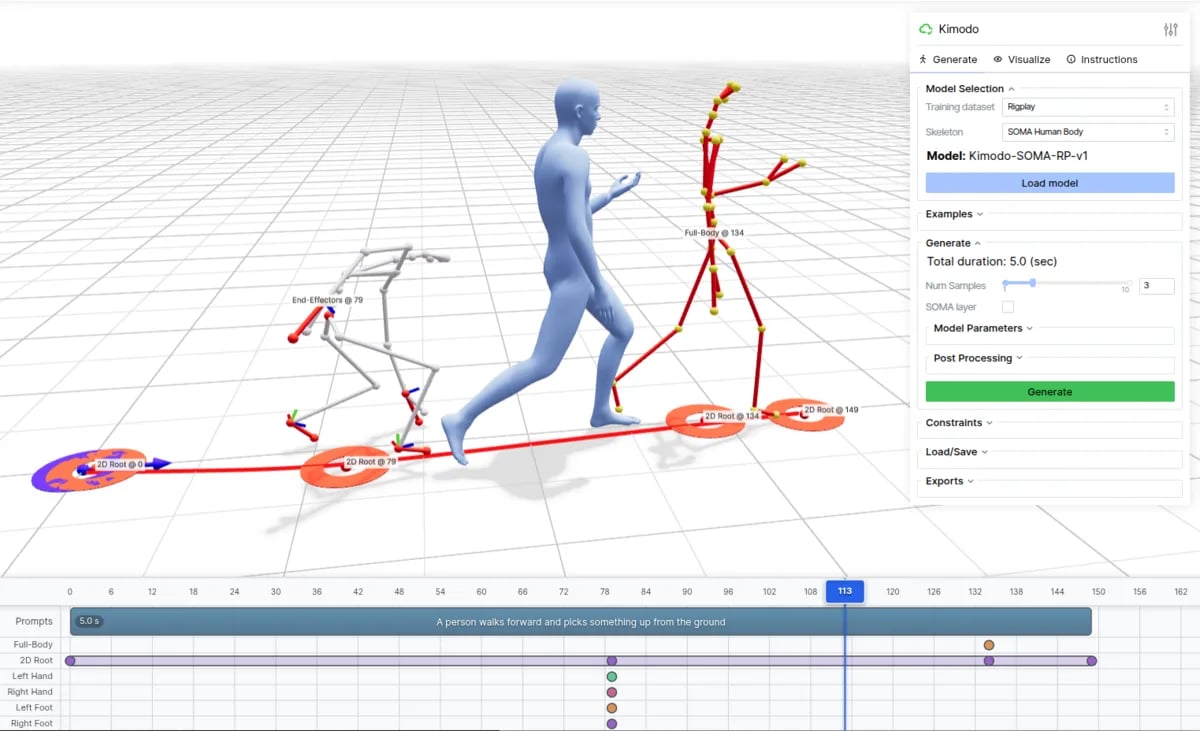
If you do have an NVIDIA card, the official repo also includes a browser-based interface (kimodo_demo): a 3D preview on top, a timeline below. You place text descriptions and constraints on the timeline, pick a model and set the length on the right, then hit Generate.
How to use Kimodo: the free UE 5.9 plugin, the cloud, and Blender
1. Built into Unreal Engine 5.9: AnimGenOffline
The Unreal Engine 5.9 preview, which Epic released on November 9, 2026, adds an AnimGenOffline plugin that generates animation with AI right inside Sequencer, and the first model it supports is Kimodo. You set key poses on the timeline, draw a path, write a description, and it fills in the motion in between.
This is the easiest free option right now, but you still need a strong enough NVIDIA card, and since it's a preview, the plugin's name and features may change.
2. In the cloud: Replicate
No graphics card? Replicate has a community deployment of Kimodo (sprited/kimodo, not official NVIDIA). You type a description on the web page and it generates the motion. It exports GLB and BVH, and also FBX on the Mixamo skeleton. If your character already uses the Mixamo skeleton, that's the fastest format to drop in. Replicate bills by GPU time used, so check the page for actual pricing.
3. A Blender animation add-on: Animatica
Animatica packages the Kimodo family of models as add-ons for Blender, MotionBuilder, and 3ds Max, so you don't have to set up your own server. The plans I saw were a free tier with 10 generations a month, credit packs you buy per use, and a yearly Pro plan. Plans change quickly, so check their site.
Kimodo in a real game: AI characters playing drums and bass to a song
After all the specs, the best explanation is a real example in a game. Japanese indie game developer ShadeLurk (creator of the rhythm game BEAT VISTA) recently shared two videos: one character playing bass to a song, and another playing drums to a song.
According to his posts, the pipeline splits the work across four tools:
Step | Tool | What it does |
|---|---|---|
1. Character | Tripo | Generates the 3D character model |
2. Chart | Gemini 4 Carbon | Pulls a drum chart from the song's audio and decides which drum each hit goes to |
3. Motion | Kimodo (AnimGenOffline in UE 5.9) + Fable 5.2 | Generates the performance motion from the chart |
4. Playback | Unity | Plays the motion along with the chart and does the final fixes |
A few things stand out:
1. The motion is generated in Unreal, the game runs in Unity. Here Unreal is just an "offline animation generator." Once the motion is done, it goes back to Unity. In other words, even if your game isn't built in Unreal, you can still use the Kimodo plugin in UE 5.9 to make motion.
2. He doesn't stop at "looks right." He measures every hit. The bottom of the video shows live how many millimeters the stick tip is from the drum head and how many centimeters from the target, what angle the kick drum beater is at and whether it touches the head, and then tallies how many hits on each drum "landed." The whole song is 644 hits, checked one by one.
3. AI-generated motion isn't the final product. It needs fixing. The bass video puts "Kimodo's raw output" side by side with "after fixes":
The big movements Kimodo generates (holding the bass, the body groove, the hand moving along the neck) already look natural, but the fingers don't land on the right string and fret. In Unity, he separately snaps the fingertips to the correct string positions, pins the feet in place, and adds body sway.
That's exactly the limitation NVIDIA lists: Kimodo can't see objects in the scene. It doesn't know where the bass strings are or how high the drums sit, so any motion that has to "touch something" ends up being fixed by code or by hand.
Kimodo's limitations
Putting the official docs together with the example above, here's what to know before you start:
- It doesn't always follow the text: NVIDIA says so itself. The motion won't always match the description exactly, and you often have to generate a few times and pick one.
- It can't see the scene: it doesn't know how tall the chair is, where the table is, or what the hand is holding. Sitting down, picking things up, and playing instruments all need fixing at the end.
- Skeletons need converting: the output is on the SOMA, SMPL-X, or G1 skeleton, so it has to be retargeted before it fits your own character.
- The barrier is the graphics card: running it locally needs an NVIDIA card. Without one, you'll need the cloud.
How I'd use Kimodo
The homepage of my site is a moon base. The main character, Terry, can walk around, sit in the studio chair, nap on the couch, and pick up the handheld on the desk to play Snake. All of those motions come from stock animation packs. Sitting and lying down are covered, but something like "looking down while playing a handheld" isn't, so for now he just holds the handheld at his chest in a seated pose. The RPG I'm designing has the same problem: the story needs far more motions than any pack has.
That's exactly the kind of motion Kimodo is good for: "not in the generic packs, and I don't want to key it myself." I'd generate in the cloud first, export a Mixamo FBX, then retarget it to the character's own skeleton. Anywhere the character has to touch something (holding the handheld, the right height on the couch), I'd follow ShadeLurk's approach and fix it in the game.
Wrap-up: AI handles the motion, people handle the moment of contact
Models go to Tripo AI, motion goes to Kimodo. The two big hurdles of making a 3D game solo both have AI help now. But as ShadeLurk's example shows, AI-generated motion gets you "roughly right." What actually makes a player believe "he's really drumming" is fixing those last few centimeters. That part still needs a person to decide and to measure.
Have you tried generating character animation with AI? Come find me on Threads or X and leave a comment on one of my posts.